Connect Fish
How to Play Connect Fish
Playing Connect Fish is simple and intuitive, whether you are on desktop or a touchscreen device.
- Desktop Controls: Use your mouse to left-click on a fish tile to select it, then click on the matching tile to connect and clear the pair.
- Touchscreen Devices: Tap on a fish tile with your finger to select it, then tap the identical tile to connect and remove the pair.
The game interface includes helpful controls on the right side of the screen:
- Score display, current level, and timer at the top.
- Pause button to temporarily stop the game.
- Fullscreen toggle button to switch between windowed and full-screen modes.
- Speaker and music buttons to mute or enable sound effects and background music.
- Hint button to reveal a possible match when stuck.
- Shuffle button to rearrange tiles if no moves are available.
On the level selection screen, drag left or right on the wave-patterned icons to browse through levels. Use the play button to start your chosen level and the menu button to return to the welcome screen.
What is Connect Fish?
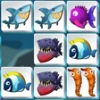
Connect Fish is a captivating free online browser game that combines the classic Mahjong Connect gameplay with a charming sea creature theme. Players match identical fish tiles by connecting pairs with a clear path that has no more than two right angle turns. The goal is to clear the entire field before the timer runs out, offering an engaging challenge for puzzle enthusiasts and casual gamers alike. This unblocked game is perfect for quick sessions or extended play, featuring vibrant underwater graphics and smooth controls optimized for both desktop and touchscreen devices. With 30 progressively challenging levels, Connect Fish invites players to test their memory, strategy, and speed in a relaxing aquatic environment.
Gameplay & Features
- Match tiles featuring colorful fish to clear the board.
- Each pair must be connected by a path with no more than two 90-degree turns.
- Beat the clock: clear levels before the timer expires to earn extra points.
- Bonus points awarded for clearing pairs quickly in succession, encouraging fast thinking.
- 30 levels of increasing difficulty provide hours of engaging gameplay.
- Intuitive controls: mouse clicks on desktop and finger taps on touchscreen devices.
- On-screen controls include pause, fullscreen toggle, sound and music toggles, hint, and shuffle buttons.
- Level selection screen features a wave-pattern navigation for easy browsing.
- Score tracking and level indicators keep players informed throughout the game.
- Play now in your browser without downloads or installations.
Related & Series Games
If you enjoy Connect Fish, you might also like other engaging connect-style browser games that offer unique twists and mechanics. Cookie Connect invites you to match delicious treats in a colorful puzzle environment perfect for keyboard or touch controls. Connect 4 brings the classic strategy game online, where you can challenge your logic skills by forming four in a row. Block Connect tests your spatial awareness by fitting blocks to clear the board, ideal for both desktop and mobile play. Lastly, Pipe Connect Puzzle challenges you to rotate pipes and create pathways for water flow, combining logic and timing in a relaxing browser experience.
Tips & Strategies
- Prioritize clearing pairs near the edges first to open up more connection paths.
- Use hints sparingly to save them for tricky situations when no obvious moves appear.
- Shuffle tiles when you’re stuck, but be mindful of your remaining time.
- Practice quick selection to build combos and earn bonus points for rapid matches.
- Stay calm and plan moves ahead to avoid wasting valuable seconds on the timer.
FAQ
- Is Connect Fish free to play? Yes, it is completely free and accessible online.
- Can I play Connect Fish on mobile devices? Absolutely, it supports touchscreen controls for seamless play on smartphones and tablets.
- Is Connect Fish unblocked at school or work? Yes, this browser game is typically unblocked and easy to access anywhere.
- Do I need to download anything to play? No downloads are required; just open your browser and play now.
- Are sound and music options available? Yes, you can toggle audio effects and music on or off during gameplay.