Choppy Orc
How to Play Choppy Orc
Mastering Choppy Orc is simple with the following controls:
- Keyboard Controls: Use the WASD keys or Arrow keys to move your orc left, right, and jump (W or Up Arrow).
- Press Spacebar, X, or J to swing your axe and chop objects or enemies blocking your path.
- Hit R to restart the current level anytime if you get stuck.
- Press Escape to access the game menu for options or quitting.
Xbox Controller Controls:
- Move using the D-pad.
- Jump by pressing Button A.
- Use the axe with Button X.
- Restart levels by pressing Button Start.
- Access the menu with Button Back.
For mobile or touch devices, use on-screen directional pads and buttons where available, or connect a compatible controller for the best experience. Simply load the game in your browser and start chopping now!
What is Choppy Orc?
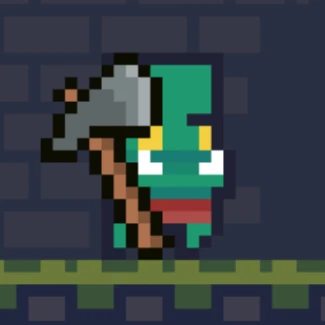
Choppy Orc is a free, online platformer browser game featuring a charming orc who loves chopping objects with his trusty axe. Developed by eddynardo with graphics by 0×72 and Adam Saltsman, this unblocked game combines simple controls with engaging gameplay. Players can enjoy a nostalgic retro vibe while navigating vibrant levels filled with obstacles to chop through. Perfect for quick gaming sessions, Choppy Orc is accessible directly in your browser without any downloads or installations.
Gameplay & Features
- Easy-to-learn controls using WASD or arrow keys for movement and jumping, making it ideal for keyboard users.
- Intuitive axe usage with spacebar, X, or J keys to chop various in-game objects.
- Supports Xbox controllers for a seamless gaming experience, including D-pad movement and button-based actions.
- Restart and menu options available via keyboard or controller for smooth gameplay management.
- Retro pixel art graphics create a visually appealing environment that’s both nostalgic and fresh.
- Fast-paced levels encourage quick reflexes and strategic chopping to progress.
- Unblocked and playable in any browser, ensuring easy access at school, work, or home.
- Perfect for players seeking a fun, casual platform game to play now online.
Related & Series Games
If you enjoy Choppy Orc, you’ll love exploring other web-based browser games that offer similar fun and engaging mechanics. These games are designed for smooth keyboard or touch controls, making them perfect for both desktop and mobile players. Dive into exciting adventures with intuitive controls and charming pixel art styles that complement Choppy Orc’s gameplay. Each title provides unique challenges and creative levels to keep you entertained for hours. Whether you prefer precise keyboard inputs or responsive touch gameplay, these related games deliver a fantastic experience without the need for downloads.
Tips & Strategies
To master Choppy Orc, focus on timing your jumps carefully to avoid hazards while positioning yourself optimally for chopping. Use the axe efficiently by anticipating enemy movements and breaking obstacles quickly to maintain momentum. Restart levels promptly if you get stuck to keep your progress smooth. Experiment with both keyboard and controller inputs to find the most comfortable setup. Stay patient and learn enemy patterns to maximize your score and enjoy longer gameplay sessions. Playing the game in an unblocked environment ensures uninterrupted play, so take advantage of that to hone your skills.
FAQ
Is Choppy Orc free to play? Yes, it is completely free and accessible online.
Can I play Choppy Orc on any device? It is primarily designed for browsers on PC but also supports Xbox controllers and can run on devices that support web browsers.
Is Choppy Orc unblocked at school or work? Yes, this browser game is unblocked and can be played freely in most restricted environments.
Do I need to download anything? No downloads are required; simply play now directly in your browser.
Are there other similar games available? Yes, there are many related browser games with similar mechanics and fun challenges.